
Skip to content

Security

This setup is designed for easy user experience, however, you must keep your account, QZAR session, backup keys, and trading funds safe. Always protect your main login details.

Use a dedicated trading wallet

  • Keep long-term holdings in a separate wallet that is never imported into a trading bot
  • Fund QZAR with the capital needed for your active strategy
  • Use multiple wallets or groups for your trading setup, not as a substitute for proper backups
  • Withdraw unused funds when you stop trading actively

Protect recovery material

Your private key or recovery phrase can restore the wallet and authorize transactions. Anyone who obtains it can move funds without QZAR knowledge.

  • Write it down offline and store it securely
  • Do not keep it in messages, screenshots, email, browser storage, or cloud notes
  • Never send it to support
  • Run the backup and see if it restores the expected public address before
Exposed recovery material means an exposed wallet
If a private key or recovery phrase appears in a chat, screenshot, screen share, cloud note, or untrusted device, assume it is compromised. Create a fresh wallet and move remaining assets; changing the QZAR wallet password cannot rotate an exposed key.

Protect Telegram

  1. Enable Telegram two-step verification
  2. Review Settings → Devices and terminate unknown sessions
  3. Add an app passcode or biometric lock
  4. Hide message previews on the lock screen
  5. Treat QR login codes and one-time codes as secrets

Wallet PIN in QZAR

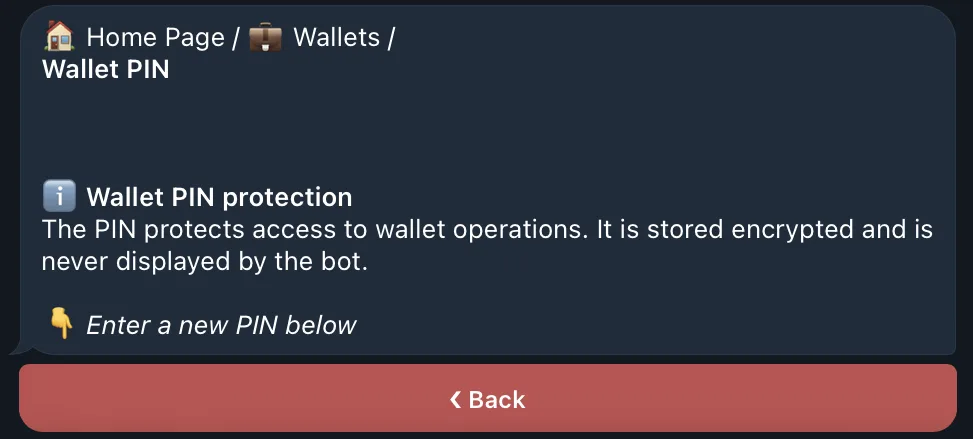
QZAR requires a PIN before revealing a private key. This reduces accidental or unauthorized use of the export action inside the bot. It does not revoke a key that was already exposed and it doesn't protect against every compromised session.
Automation remains active while you are away
Automation changes the threat model: limit orders and auto trade can execute while you are away. Review active orders after changing a strategy, moving funds, or suspecting account compromise.
The QZAR wallet PIN screen used to set or change the PIN required before a private key can be exported

If you suspect compromise

  1. Stop active orders and disable auto trade if you can safely access QZAR
  2. From a trusted device, create a new wallet whose recovery material has never been exposed
  3. Move remaining assets to the new address
  4. Terminate and/or change 2-step verification credentials
  5. Contact QZAR only through links on qzar.io, never share your secret recovery materials